
You can update your password at any time directly from your dashboard. This helps you protect your account, improve security, or reset credentials if needed. The process only takes a few clicks and ensures your access to QuadC remains safe.
Access Your Dashboard
Start by logging into your QuadC account.
-
Open your main dashboard after signing in
-
Confirm you are logged into the right workspace
Navigate to Security Settings
Once inside your dashboard:
-
Click on Go to Security
-
Change your password
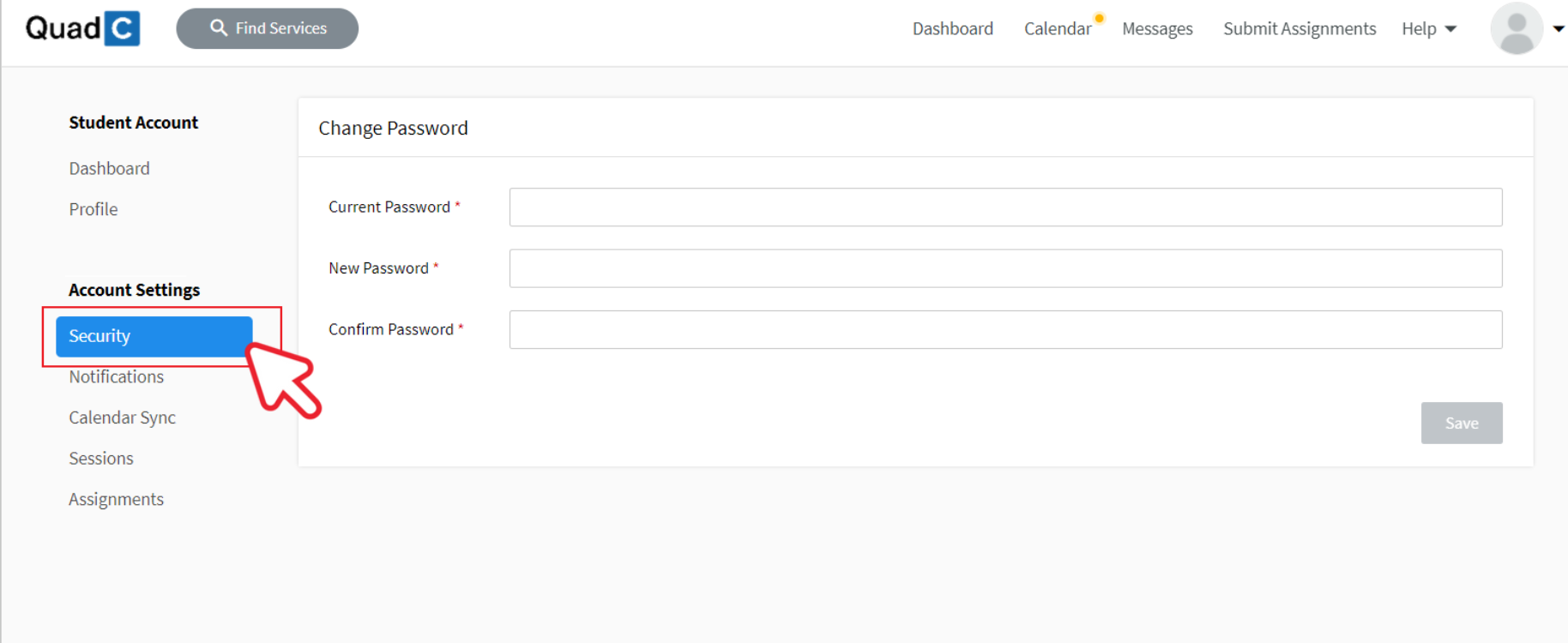
This section allows you to manage your login credentials and keep your account secure.
Update Your Password
When changing your password:
-
Enter your current password
-
Create a new, strong password
-
Confirm the new password
-
Save your changes
Follow Password Best Practices
Use these recommendations to strengthen your account security:
-
Use at least 12 characters
-
Include uppercase and lowercase letters
-
Add numbers and special characters
-
Avoid reusing passwords from other platforms
| Security Tip | Why It Matters |
|---|---|
| Use a long password | Makes it harder to guess |
| Avoid common words | Reduces vulnerability to attacks |
| Change periodically | Lowers long-term risk |
| Keep it private | Prevents unauthorized access |
If you ever experience login issues, review your credentials in the Security section or reset your password from the login page.