
Control how your AI Bot interprets course materials by selecting a content processing mode inside QuadC AI, with each option balancing speed and accuracy, and Multimodal Content Processing providing the most advanced capability for handling complex academic content like images, tables, and equations.
Select the Appropriate Processing Mode for Your Content
Choose between three processing types under Performance settings. Each serves a different instructional need.
| Processing Type | Best For | Trade-Off |
|---|---|---|
| Fast Content Processing | Text-heavy documents | Faster, but weaker with visuals and tables |
| Smart Content Processing | Mixed content with moderate complexity | Slower, but more accurate |
| Multimodal Content Processing | Complex materials with visuals and structure | Most advanced, highest accuracy |
- Use Fast Processing when speed matters and content is primarily text
- Use Smart Processing for balanced performance across structured materials
- Use Multimodal Processing when accuracy and depth are critical
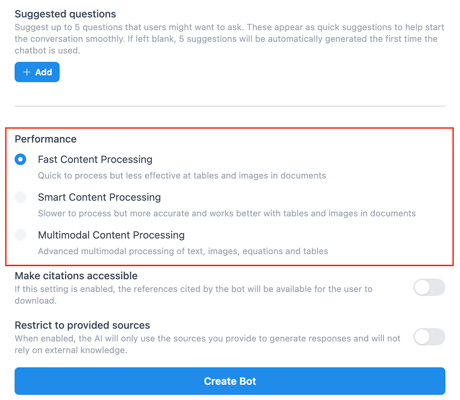
Each option ensures your AI Bot performs effectively within your course environment on QuadC AI.
Leverage Multimodal Content Processing for Advanced Learning
Multimodal Content Processing is powered by advanced GraphRAG architecture. It enables your AI Bot to go beyond basic retrieval and deliver deeper, more contextual academic support.
With Multimodal Processing, your bot can:
- Synthesize concepts across multiple documents to generate more analytical responses
- Interpret images, diagrams, and visual data within course materials
- Understand tables and structured content with higher accuracy
- Connect content across languages, such as French and English resources
By enabling Multimodal Processing, you strengthen how your AI Bot delivers information and maintains trust in academic environments.
You benefit from:
- Higher answer accuracy across complex materials
- Clear source attribution, improving transparency for students
- Consistent interpretation of visuals and structured data
- Reduced risk of misinterpretation in technical subjects
This ensures that every response aligns with your course materials and reinforces academic integrity inside QuadC AI.
Align Processing Choices with Your Teaching Strategy
Your processing selection should reflect how your course content is structured and how students are expected to engage with it.
- Choose Multimodal Processing for STEM, data-heavy, or visual courses
- Use Smart Processing for general academic content with mixed formats
- Apply Fast Processing for quick access to text-based resources
By aligning processing with your instructional design, you ensure your AI Bot delivers consistent, high-quality support tailored to your course.
This flexibility is what makes QuadC AI a scalable solution for institutions. You adapt AI performance to your needs, instead of adapting your course to the technology.