
Create your QuadC student account by signing up with your institutional email and completing your profile. Once you verify your email, you gain full access to the platform’s services. If your institution uses Single Sign-On (SSO), log in with your school credentials and skip email verification.
This process ensures secure access, accurate student records, and personalized support across the QuadC platform. Every step connects directly to the services provided by your institution inside QuadC, from AI-powered tutoring to campus support tools.
Sign Up Using Your School Credentials
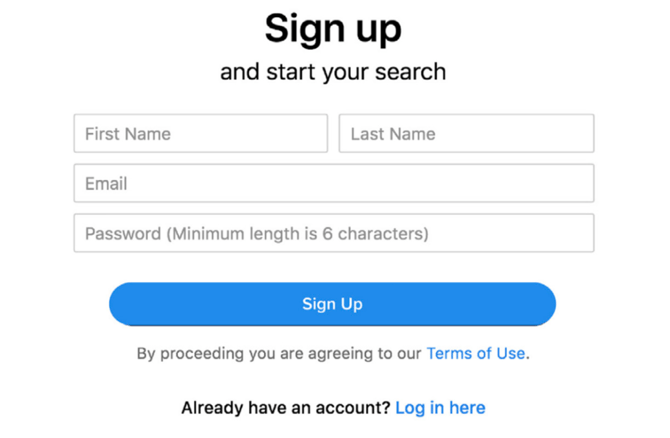
Register your account using your first name, last name, institutional email address, and a password. This links your profile directly to your institution.
If your school provides Single Sign-On (SSO), you:
-
Use your institutional login credentials
-
Access the platform instantly without creating a separate password
Why this matters to you:
-
Your access is secure and institution-approved
-
Your account connects to campus services
-
Unlock QuadC tools designed specifically for your school
QuadC products are built to integrate directly with institutional systems, making onboarding simple and reliable.
Complete Your Student Profile
After signing up, you complete your profile by entering additional academic details. This step ensures the platform delivers relevant services and support.
You may be asked to provide:
-
Student number
-
Campus location
-
Program of study
-
Semester or academic level
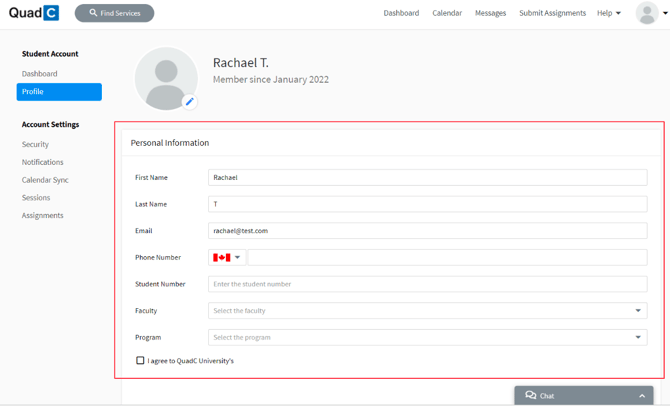
By completing your profile, you enable QuadC to tailor AI-driven assistance, scheduling, and campus services specifically to your academic journey.
Verify Your Email Address
Verify your email address to activate your account and access all platform features. This step confirms your identity and protects your data.
You complete verification by:
-
Checking your inbox
-
Clicking the confirmation link
-
Returning to the platform to log in
If you use Single Sign-On, you do not need to verify your email separately. Your institution already confirms your identity.
Verification ensures:
-
Secure platform access
-
Full access to QuadC services
-
Protection of your academic information
Access QuadC Services After Activation
Once your account is active, you can begin using QuadC tools immediately.
Depending on your institution’s setup, you may access:
-
AI tutoring support
-
Service scheduling
-
Embedded AI tools inside your LMS
-
Personalized learning assistance