
Interactive WebApp generation in QuadC AI allows you to create dynamic learning experiences directly inside the chat interface. You can ask QuadC AI to build custom WebApps that explain concepts, simulate scenarios, or provide interactive educational tools in real time. This feature helps you move beyond static explanations by turning lessons into interactive learning activities that support deeper understanding and engagement.
Create Interactive Learning Experiences
Use QuadC AI to generate WebApps tailored to the exact topic you are studying or teaching. Instead of only receiving text-based explanations, you can interact with live tools that demonstrate how concepts work.
These WebApps can support:
- Interactive calculators
- Scientific or mathematical simulations
- Dynamic biology concepts
- Scenario-based demonstrations
- Custom educational utilities
Because the WebApps are generated directly from your conversation, they align with the context of your lesson and adapt to your learning goals inside QuadC AI.
Create WebApp Tool and Access Your WebApp
Generate interactive WebApps directly through chat in QuadC AI to create hands-on learning experiences tailored to your topic or lesson.
Follow this workflow
- Open a chat session in QuadC AI
- Ask the AI to generate a WebApp for your topic
- Wait for the WebApp to finish generating
- Select the generated WebApp button in the chat to open the interactive experience
- Interact with and refine the WebApp as needed
Use prompts to generate custom WebApps
- “Generate a WebApp to illustrate photosynthesis.”
- “Generate a WebApp to simulate supply and demand curves.”
- “Generate a WebApp to visualize quadratic equations.”
- “Generate a WebApp to demonstrate chemical bonding.”
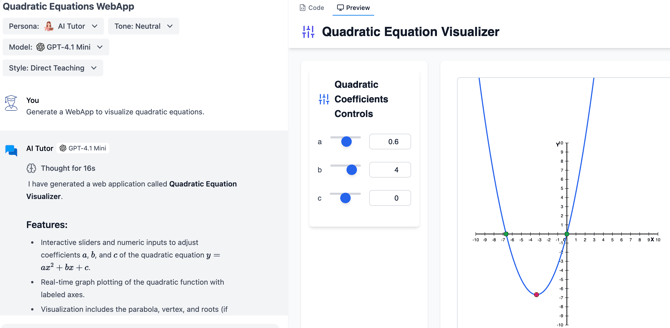
This workflow allows you to quickly build interactive educational content without needing programming knowledge.
Interact With and Refine Your WebApp
After generation, you can open the WebApp in a dedicated interactive panel where you can test, modify, and improve the experience.
The interface allows you to:
- Interact with generated simulations
- Adjust variables and inputs
- Refine the design through additional prompts
- Troubleshoot rendering or display issues
- Continue collaborating with the AI in real time
This iterative workflow helps you continuously improve educational experiences while keeping all learning activities connected to your chat session inside QuadC AI.
Support Active and Personalized Learning
Interactive WebApps help you turn concepts into hands-on learning experiences by allowing you to explore, test, and visualize ideas directly inside QuadC AI.
- Improve understanding through hands-on interaction
- Visualize abstract or complex concepts
- Explore real-time outcomes by changing variables
- Increase learner engagement
- Support personalized learning workflows
- Adapt activities to different education levels
By combining conversational AI with dynamic WebApps, QuadC AI helps create more engaging and adaptable learning environments for students, educators, and institutions.