
You can quickly search and identify the right host inside the QuadC Connect. Using the Find Services feature in QuadC platform, you can search by subject, course, or host name, apply filters to narrow results, and review detailed host profiles. If you already found your host, learn how to book a session.
Everything is designed to help you confidently identify the right support before you schedule anything.
Start Your Search from Find Services
You begin your search directly inside the QuadC Connect.
To find a host:
-
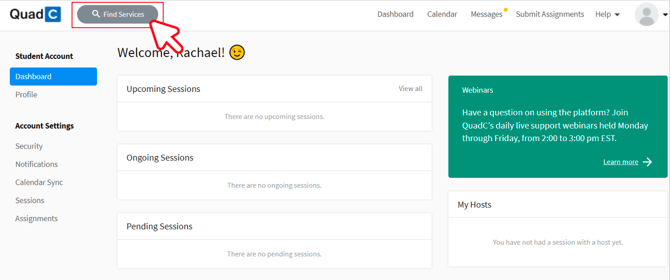
Click Find Services at the top of the page.
-
Select List View.
-
Enter a subject, course code, or host name in the search bar.
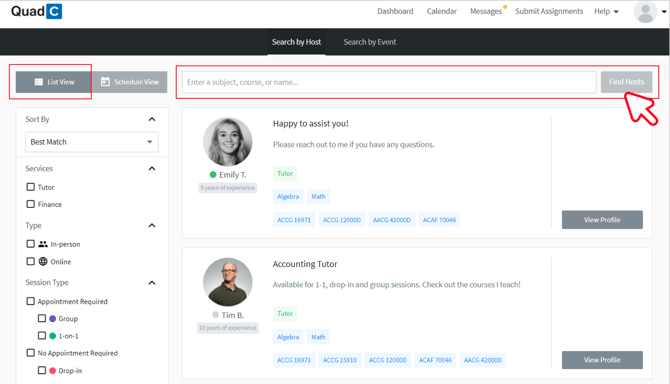
You can search broadly, such as by subject area, or narrow your results using a specific course code or host name. This gives you flexibility depending on how specific your need is.
Filter Results to Match Your Needs
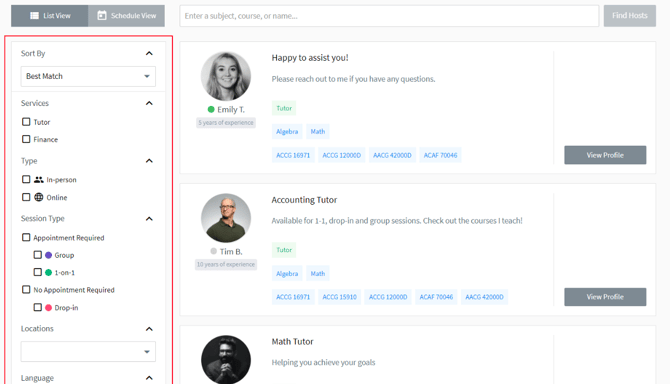
You can refine your search using filters to quickly narrow down relevant hosts.
Available filters include:
-
Service – Select the type of support you need.
-
Type – Choose online or in-person sessions.
-
Session Type – View scheduled or drop-in availability.
-
Location – Filter by campus or delivery site.
-
Language – Select your preferred language.
-
Status – Check current availability.
-
Rating – Review student feedback.
Understand What Each Filter Controls
| Filter | What You Adjust | Why It Helps You |
|---|---|---|
| Service | Subject or support category | Keeps results relevant |
| Type | Online or in-person | Matches your learning preference |
| Session Type | Scheduled or drop-in | Aligns with your urgency |
| Rating | Peer reviews | Builds confidence in your choice |
By narrowing your results, you avoid scrolling through unrelated options and focus only on hosts who meet your criteria.
Review Host Profiles Before Moving Forward
You can expand any host profile to see more detailed information before deciding.
When viewing a host profile, you can:
-
Read a full description of expertise and support areas
-
View availability windows
-
See ratings and student reviews
-
Confirm service type and delivery format
To explore profiles:
-
Scroll through the results that match your search.
-
Click on a host profile to expand and view details.
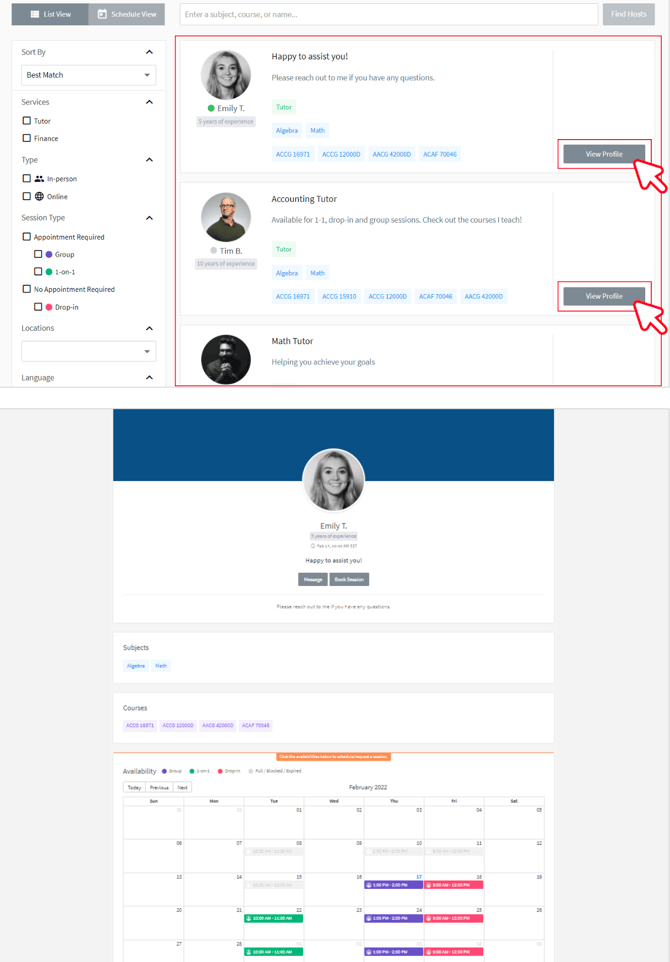
This step helps you evaluate whether the host’s background and availability align with your course and learning needs.
Identify the Right Support with Confidence
You can search, filter, and review host profiles in minutes without leaving the QuadC Connect environment. The structured search system helps you move from a broad query to a focused list of qualified hosts.
Once you identify the right host, you can proceed to booking in the next step.