
QuadC Adaptive LMS lets you quickly generate quizzes from your course materials, helping you reduce manual work while keeping assessments tightly aligned with what students are learning inside your courses on QuadC AI.
Generate Quizzes From Your Content
You can create assessments in two ways, depending on how your course is structured:
- Generate from module content
QuadC Adaptive LMS automatically creates quiz questions based on the learning materials inside a module. - Extract from uploaded files
Upload existing quiz documents and QuadC Adaptive LMS will extract and convert them into structured questions.
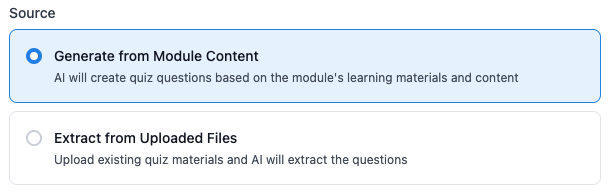
Both options help you reuse existing material instead of building assessments from scratch.
Define Question Types
From the quiz settings panel, you can choose how questions are structured to match your assessment goals.
Select Assessment Formats:
- Multiple Choice
Let students select one correct answer from a set of options. - True / False
Quick-format questions for basic concept checks. - Fill in the Blank
Students complete missing parts of a statement to test recall and understanding. - Short Answer
Open-ended responses that allow for deeper explanations and reasoning.
These options help you design quizzes that better reflect different levels of learning and evaluation needs.
Configure Quiz Rules and Timing
From the quiz dropdown menu, you can open the Rules panel to control how and when students take each quiz.
Set Assessment Controls
You can define:
- Test Date & Time Start
Lock quizzes until a specific date and time. Students will see a countdown until the quiz becomes available. - Test Time Length
Set a fixed duration for each attempt. - Exact Schedule
Restricts quiz access to a specific time window only. - Available Time
Allows students to start anytime after the opening time, with full duration granted per attempt.
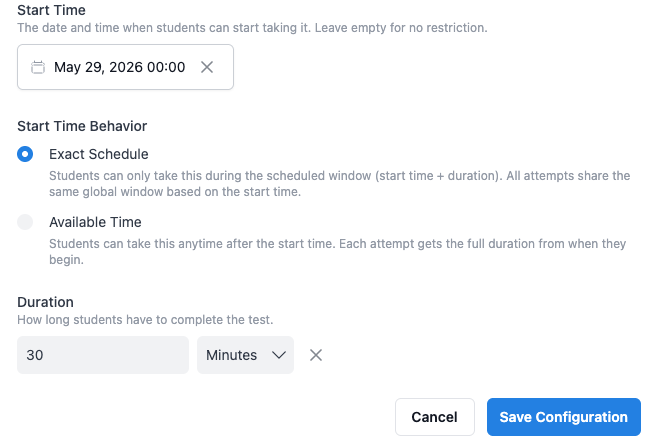
These controls help you match quiz behaviour to different learning and evaluation needs.
Apply Built-In Quiz Behaviours
QuadC AI automatically applies consistent rules to ensure fair and structured assessments:
- Incomplete answers are automatically marked incorrect
- All timing rules are clearly shown to students in the quiz interface
- All attempts follow the same global schedule based on the start time
This ensures your assessments remain consistent, transparent, and easy to manage inside QuadC AI.