
QuadC Adaptive LMS gives you simple controls to manage how your course is published, reused, and archived. You can control access for students, preserve learning data, and quickly reuse course structures for new cohorts, all within the QuadC AI platform.
Publish or Unpublish a Course
You control when students can access your course using the Publish / Unpublish toggle at the top of the course.
When you manage publishing:
- Unpublished courses are hidden from students
- Published courses become accessible immediately
- You can update content before making it visible
- Students only see finalized learning material
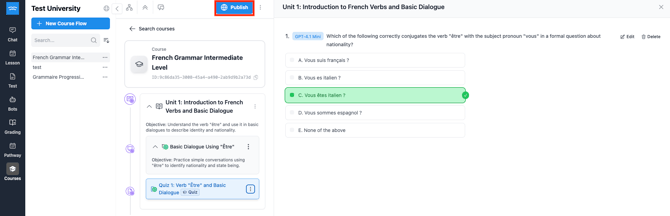
This gives you full control over when a course is ready for delivery.
Archive a Course
Archiving lets you close a course while preserving all data and activity history.
When you archive a course:
- Students keep access to their completed content
- New enrollments are blocked
- Existing student activity is locked
- Progress and quiz results are preserved
- You keep full editing access to course content
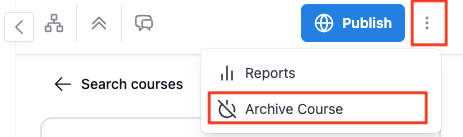
Archiving is useful when a cohort finishes and you want to maintain a clean, read-only record without deleting anything.
Duplicate a Course
You can reuse course structures without carrying over student data by duplicating a course.
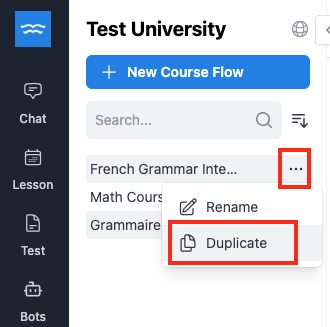
To duplicate a course:
- Click on the three-dot icon on the selected course
- Select Duplicate Course
- A new copy is created with the same structure and materials
- No students or progress are included in the new version
This allows you to:
- Launch new cohorts faster
- Keep historical records intact
- Reuse proven course designs
- Start fresh while maintaining consistency
This lifecycle management system helps you move smoothly from course creation to delivery, completion, and reuse inside QuadC AI.