
QuadC AI's Group Chat brings learners, instructors, and AI bots into a single shared conversation, making it easier to collaborate, solve problems, and stay aligned in real time. Instructors define how AI bots behave and what sources they use, so every interaction stays relevant to the course.
Create a Group Chat and Add Participants
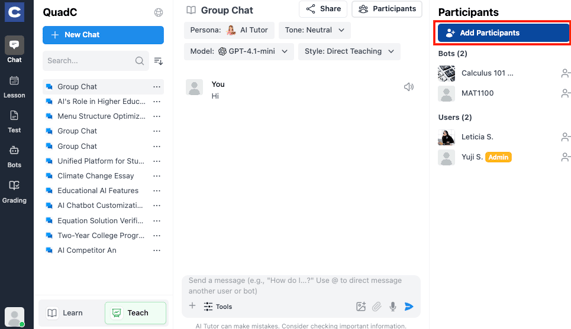
Start by creating a Group Chat and inviting the right people into a shared space designed for collaboration.
-
Create a new chat or continue a previous chat
-
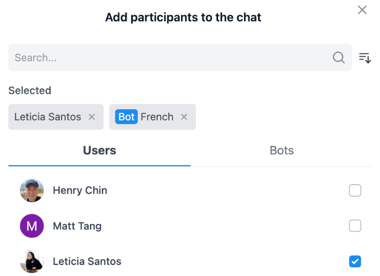
Add participants from your institution

-
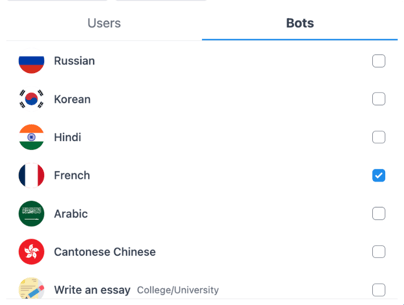
Add multiple AI bots configured by instructors
-
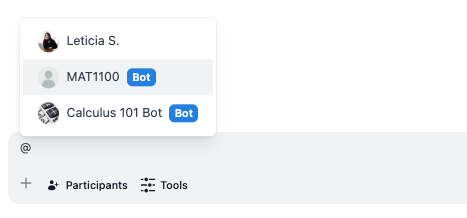
Use “@” to tag participants or bots for responses
Collaborate in Real Time with Group Chat
Keep everyone engaged by allowing multiple participants and AI bots to interact in the same live conversation. This removes delays and eliminates the need to switch between tools.
-
Join conversations anytime, during or outside class
-
Ask follow-up questions and build on shared ideas
-
Let AI bots respond to the entire group at once
-
Keep all communication centralized and easy to follow
Group Chat supports faster, more effective collaboration across your institution.
To configure AI bots with course-specific instructions, behaviour, and sources, follow this guide.
Keep Information Visible and Organized in Group Chat
Reduce confusion by keeping all messages, resources, and answers in one shared space where everyone has access.
-
Share deadlines, explanations, and materials in a single thread
-
Avoid repeated questions with full conversation history
-
Maintain clarity across group work and discussions
-
Encourage accountability through shared visibility
Group Chat helps you create a more transparent and coordinated learning environment.
Apply Group Chat Across Learning Scenarios
You can use Group Chat in different academic contexts without needing additional tools.
| Use Case | How You Use Group Chat | Result |
|---|---|---|
| Study groups | Combine learners with course-specific bots | Better understanding and task tracking |
| Classroom role-play | Use bots with defined behavior for simulations | More engaging participation |
| Peer tutoring | Add writing or subject-specific bots with curated sources | Real-time feedback |
| Live help sessions | Use FAQ bots aligned with course content | Faster responses at scale |
Each scenario shows how Group Chat supports both structured and flexible learning.
Improve Outcomes with Group Chat
Create a more connected and efficient experience by keeping collaboration, communication, and AI support in one place.
-
Get faster answers from multiple AI bots without switching chats
-
Support large groups while keeping conversations clear
-
Improve teamwork with shared visibility into solutions
-
Adapt Group Chat for different academic needs
Group Chat helps you deliver better learning outcomes by aligning people, instructor-defined AI, and resources in a single environment.