
Design an AI Bot that reflects your curriculum, teaching style, and academic standards. Inside QuadC AI, you choose how the bot behaves, what it knows, and how students interact with it. Every configuration decision directly shapes how learning happens in your course.
Select the Right Bot Type for Your Instructional Goals
Start by choosing the bot type that fits your teaching objective. Each option supports a different classroom outcome.
| Bot Type | Purpose | How It Supports Learning |
|---|---|---|
| Tutor | Guided academic support | Helps students understand concepts step by step |
| Role Play | Simulation-based learning | Acts as a character in structured scenarios |
| Prompt Bot | Flexible instruction | Responds based on your defined prompts |
If your goal is concept mastery, the Tutor bot reinforces understanding through guided reasoning. If you want applied practice, the Role Play bot enables immersive scenarios. Every choice ties back to how you want students to engage with your material.
Define the Bot’s Identity, Behavior, and Expectations
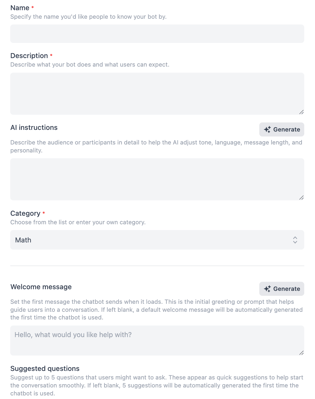
Control how the bot presents itself and how it interacts with your students. When creating the bot, you configure:
-
Name so it feels integrated into your course
-
Description to clarify what support students can expect
-
AI instructions to define tone, language level, message length, and personality
-
Category for institutional organization
-
Welcome message to guide first interaction
-
Suggested questions to prompt productive conversations
For example, you can instruct the bot to:
-
Use the Socratic method instead of giving direct answers
-
Adapt explanations for first-year or graduate-level learners
-
Provide structured, step-by-step reasoning
-
Encourage reflection before revealing conclusions
These settings ensure the AI reflects your pedagogy. You are not deploying a generic assistant. You are building a structured academic support tool aligned with your course.
Define Trusted Resources and Maintain Academic Control
Accuracy depends on controlled inputs. Inside QuadC AI, you determine exactly where the bot pulls information from.
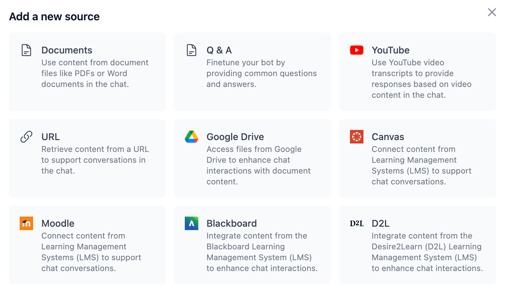
You can integrate:
-
Uploaded lecture slides and PDFs
-
Textbooks
-
YouTube videos
-
LMS platforms such as Canvas, Moodle, or Blackboard
-
Institutional materials
You also decide whether to enable:
-
Restrict to provided sources, so the AI only answers from your materials
-
Accessible citations, allowing students to download referenced sources
All integrated materials are protected under QuadC’s data privacy policy. This ensures your content remains secure while students receive reliable, course-specific guidance.
This structure protects academic integrity and keeps AI aligned with your learning objectives.
Facilitate Sharing and Institutional Collaboration
Once configured, you share your bot with:
-
Private student groups
-
Specific user lists
-
Faculty colleagues
-
Entire course cohorts
This promotes consistency across sections and reduces duplicated effort. Instructors can collaborate, refine bots, and scale best practices across departments.
Because the bot lives inside QuadC, AI usage remains centralized, secure, and aligned with institutional standards.
Enable Adaptive, Interactive Learning Experiences
After deployment, students and instructors engage with the bot through structured, interactive tools.
They can:
-
Explore materials in depth through chat
-
Participate in role play simulations
-
Generate quizzes for self-assessment
-
Create lesson plans for organized study
-
Receive adaptive guidance tailored to your course content
Every response is grounded in your approved resources. The AI becomes a structured learning partner rather than an external shortcut.
By configuring your AI Bot inside QuadC AI, you define the learning experience, safeguard your materials, and ensure artificial intelligence strengthens your instruction instead of working outside it.