
Track, review, and manage all your sessions directly from your Calendar or Dashboard. Both views give you full visibility into past, pending, and upcoming bookings, so you always know what is scheduled and what has already happened. Everything is built into QuadC Connect to keep your learning experience organized and efficient.
Manage Sessions Through Your Calendar
Your Calendar gives you a complete timeline view of your bookings. This is the best place to see everything at once. Follow These Steps to access Calendar:
-
Go to Calendar
-
Select View All
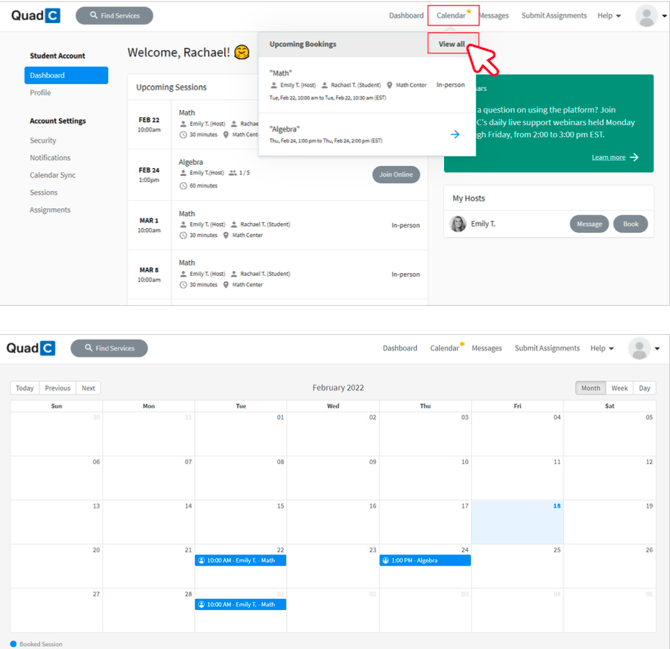
When you manage sessions through your Calendar, you can:
-
Quickly confirm dates and times
-
Keep track of multiple bookings
-
Avoid missing important academic support sessions
-
Align tutoring with your broader learning plan
Access Sessions Through Your Dashboard
Your Dashboard gives you a simplified, real-time overview of your session activity. It is ideal when you want a quick snapshot instead of a full calendar view.
From your Dashboard, you can view:
-
Upcoming sessions so you can prepare
-
Ongoing sessions so you can join instantly
-
Past sessions for quick reference
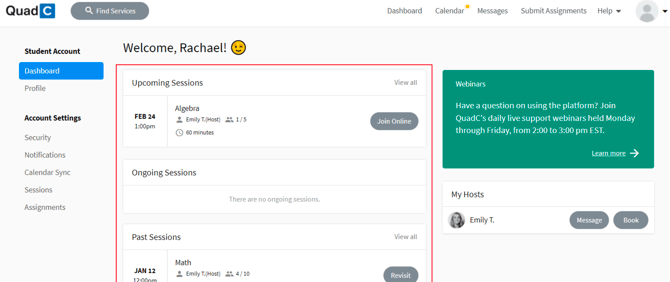
The Dashboard helps you:
-
Join sessions faster
-
Monitor what is happening today
-
Stay focused on immediate tasks
-
Keep your learning flow uninterrupted
You can switch between both view at any time depending on what you need. Together, they help you stay in control of your academic support and make the most of the QuadC Connect.