
Reduce grading time and improve feedback quality by using AI Grading Assistant. Instead of manually reviewing every submission and entering grades into your LMS, you upload your rubric and student work once, receive AI-supported grading recommendations, compare multiple model perspectives, and finalize results in minutes. With QuadC AI you spend less time grading and more time teaching.
Upload Assessments and Rubrics
Start by uploading your assessment, grading rubric and student submissions directly into AI Grading Assistant, or by importing them from your LMS such as D2L, Canvas, Moodle, or Blackboard.
QuadC connects directly to your workflow so you do not need to change how you manage your courses. You can:
-
Upload assessment files
-
Add an existing rubric or create a new one
-
Edit rubric criteria before grading begins
-
Import submissions from your LMS or directly
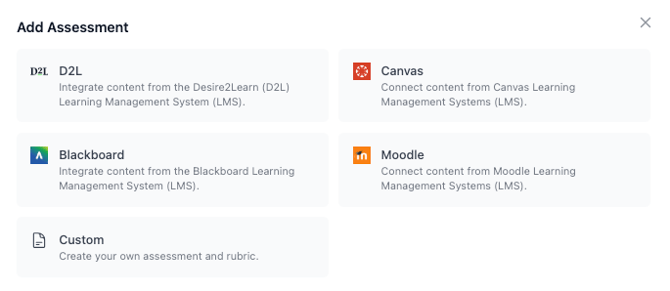
If you do not have a rubric prepared, QuadC AI can generate an editable rubric based on your assignment instructions. You stay in control and can adjust criteria, weighting, and expectations before applying it to submissions.
This ensures that grading aligns with your academic standards while leveraging the efficiency of AI.
Apply AI-Assisted Grading Aligned With Your Rubric
You receive an AI-recommended grade and detailed feedback aligned to each rubric criterion.
QuadC AI evaluates submissions against your rubric and provides:
-
A suggested score per criteria
-
A total recommended grade
-
Written feedback explaining the rationale
-
Constructive comments students can act on
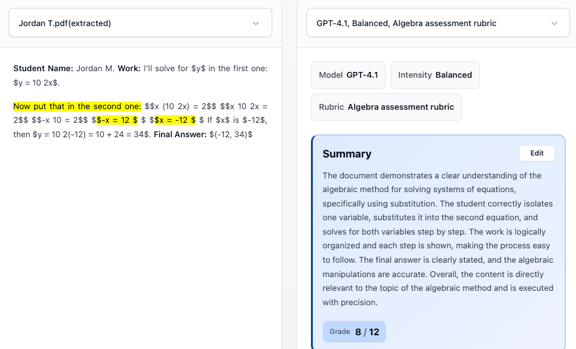
The system does not replace your judgment. Instead, it gives you a structured first review. You can quickly identify strengths, gaps, and inconsistencies across submissions.
This helps you:
-
Maintain grading consistency
-
Reduce cognitive load during large marking periods
-
Provide more structured and transparent feedback
Because grading is grounded in your rubric, the feedback remains academically aligned and defensible.
Compare Multiple AI Model Perspectives
You strengthen grading reliability by comparing multiple AI model evaluations.
QuadC AI allows you to run more than one AI model against the same submission. This enables you to:
-
Review different grading recommendations
-
Compare scoring variations
-
Identify edge cases or ambiguous responses
-
Make more informed final decisions
| Feature | Single Model Grading | QuadC Multi-Model Grading |
|---|---|---|
| Number of perspectives | One | Multiple |
| Bias mitigation | Limited | Improved through comparison |
| Confidence in edge cases | Lower | Higher |
| Instructor control | Manual override | Manual override with AI support |
This multi-model approach adds transparency and reduces bias. You are not relying on a single output. Instead, you evaluate AI-generated insights just as you would consult multiple academic viewpoints.
Customize Grades and Feedback Before Finalizing
You retain full control over the final grade and feedback.
After reviewing AI recommendations, you can:
-
Edit individual criteria scores
-
Adjust the overall grade
-
Rewrite or personalize feedback
-
Add additional instructor comments
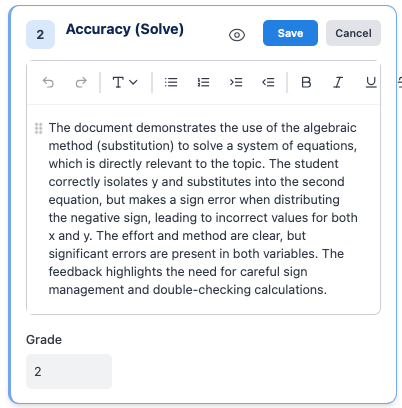
QuadC AI supports your academic voice rather than replacing it. The AI-generated feedback serves as a starting point, which you refine to reflect your expectations and teaching style.
This ensures that every final assessment reflects your expertise while saving significant time in drafting structured comments.
Export and Sync Final Grades With Your LMS
You complete the process by exporting or syncing grades directly to your LMS.
Once finalized, you can:
-
Sync grades and feedback to your LMS
-
Export results as CSV files
-
Download formatted PDF reports
This eliminates manual data entry and reduces administrative errors. Your grading workflow becomes fully connected from submission to final publication.
Save Time While Improving Academic Impact
You use AI Grading Assistant to reduce administrative workload while maintaining academic integrity. By combining rubric-based evaluation, multi-model perspectives, and full instructor control, you transform grading from a time-consuming task into a structured and efficient workflow.
Instead of spending hours sorting through submissions, you focus on mentoring, discussion, and student engagement.